Services · Three modules · One platform

Scheduling. Attendance. Payroll.

Three tightly integrated modules on one platform. Start with one — payroll if that’s the bottleneck, attendance if it’s the gate, scheduling if it’s the roster. Expand when you’re ready.

01
01
Scheduling

Build compliant rosters faster.

Built-in checks for leave, gender and staff-compliment per shift. Drag, drop, publish — with conflict detection baked in.

Capabilities · scheduling
  • Monthly roster view for all workers and sites
  • Integrated leave — no double-capturing
  • Shift compliment checks per day and site
  • Site-specific rules (shift types, geofence radius, hours)
  • Schedule vs actual view — see where gaps occurred
  • Drill-down by worker or by site
  • Configurable dashboards per role (ops, HR, payroll)
  • Export schedules to Excel / PDF
02
02
Time & Attendance

Attendance from any device, tamper-proof.

Facial recognition with liveness detection runs on gate tablets, supervisor phones — any mobile device with a camera. Built for remote, multi-site operations, with offline scanning that syncs once connectivity returns.
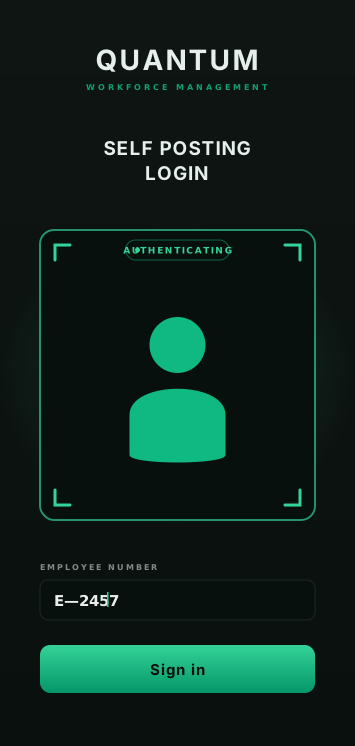
Quantum kiosk self-posting login
Kiosk · self-posting
Face-match + liveness at the gate tablet.
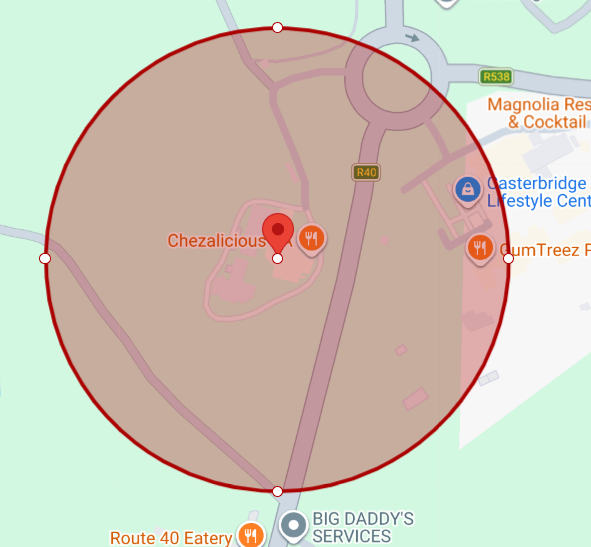
Quantum geo-fence
GEO-FENCE
Geo-fence · per site
Every sign-in GPS-verified. Out-of-fence flagged.
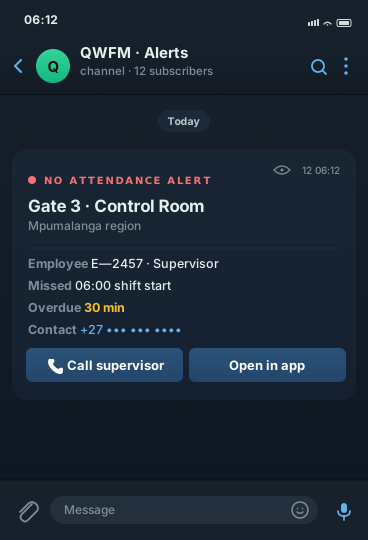
Quantum Telegram alert
Live alerts · Telegram + Email
No-attendance push 30 min after shift start.
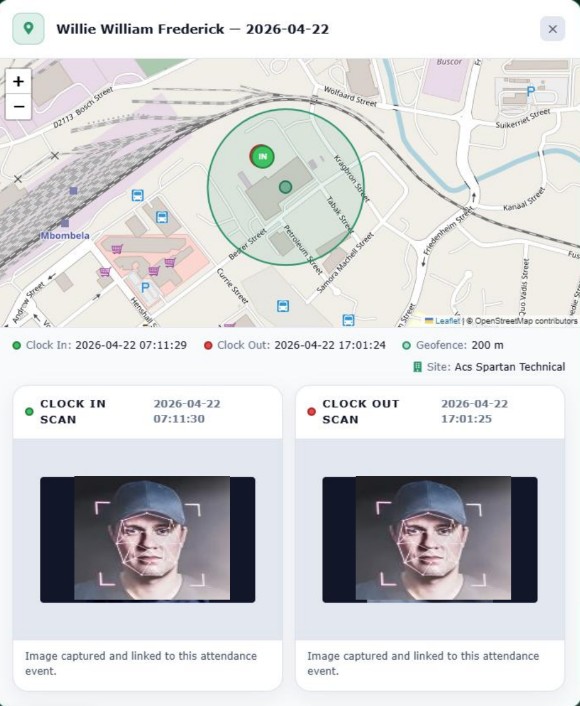
Clock-in and clock-out audit record with GPS map, timestamps and employee photos
Audit trail · per scan

Every scan, photographed and pinned on a map.

Clock-in and clock-out events each capture a photo, GPS coordinates and the site geofence — so you have defensible proof for disputes, internal audits and client reviews.

  • GPS check-in vs geofence — on a live map
  • Clock-in & clock-out photos saved with the event
  • Full timestamps, kept for the entire audit window
Capabilities · attendance
  • Supervisor and self-posting modes
  • Facial recognition with liveness at every scan
  • Geo-fencing per site + GPS capture for every event
  • Automatic schedule check — flag off-schedule scans
  • Real-time non-attendance and exception dashboards
  • Capture reasons for no-shows and late arrivals
  • Schedule vs actual reporting by site or worker
  • Full audit trail for every attendance event
03
03
Payroll

Real-time payroll from your roster.

No manual capturing. No import / export gymnastics. Live payslip calculation as shifts are approved — native to the platform.

app.quantumwfm.com / payroll
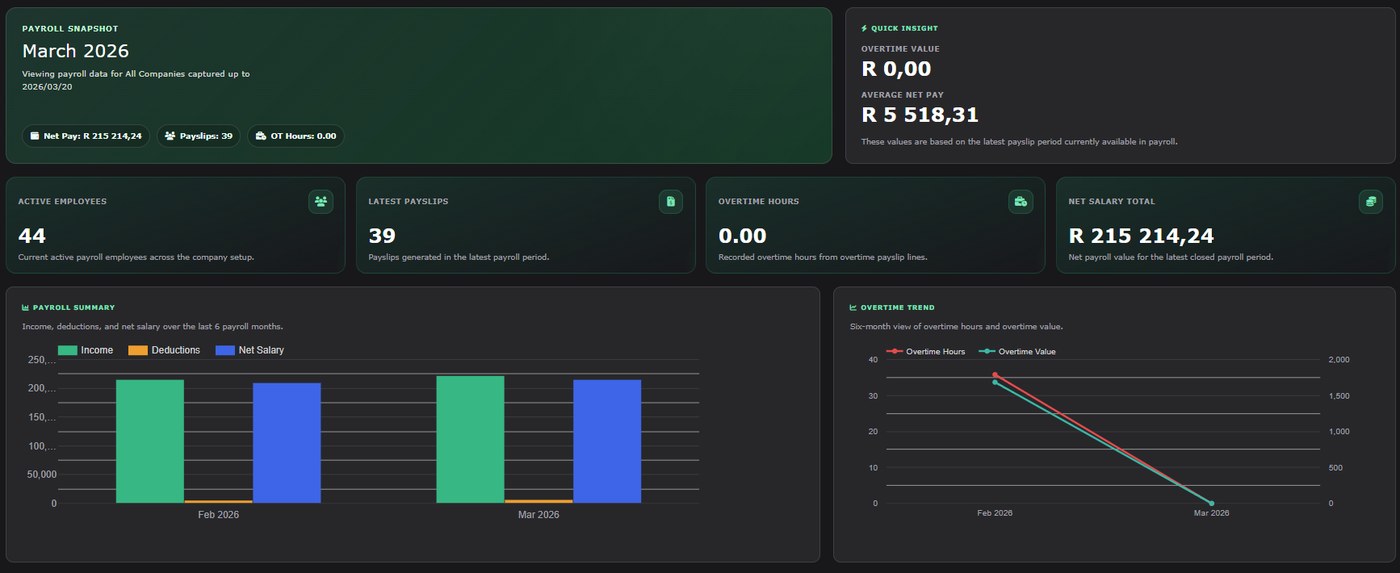
Quantum payroll dashboard — net pay, payslips, OT hours, payroll summary + overtime trend charts
Payroll snapshot · live

Net pay, payslip count, overtime — one glance.

Cross-company dashboard with the current pay period totals, a six-month payroll summary and an overtime trend — so you know exactly where the wage bill is sitting before you run.

SARS-ready exports · native
Everything you file, generated from approved hours.
EMP201 EMP501 UIF U-filing U2 PAYE SDL
Capabilities · payroll
  • Live payslip calculation as shifts are approved
  • Weekly, fortnightly and monthly pay frequencies
  • EMP201 & EMP501 reports — Excel / PDF
  • UIF Declaration — U-filing U2 CSV exports
  • Contribution reports for PAYE, UIF, SDL & benefits
  • Multi-company payroll in a single instance
  • Configurable pay groups and earning / deduction rules
  • Locked pay runs with detailed audit logs
  • Email or print payslips in bulk — on demand, by site, by pay group
04
Dashboards

Real-time from anywhere.

Live data from any PC or mobile device. Managers respond faster, make better decisions, maintain full operational control.

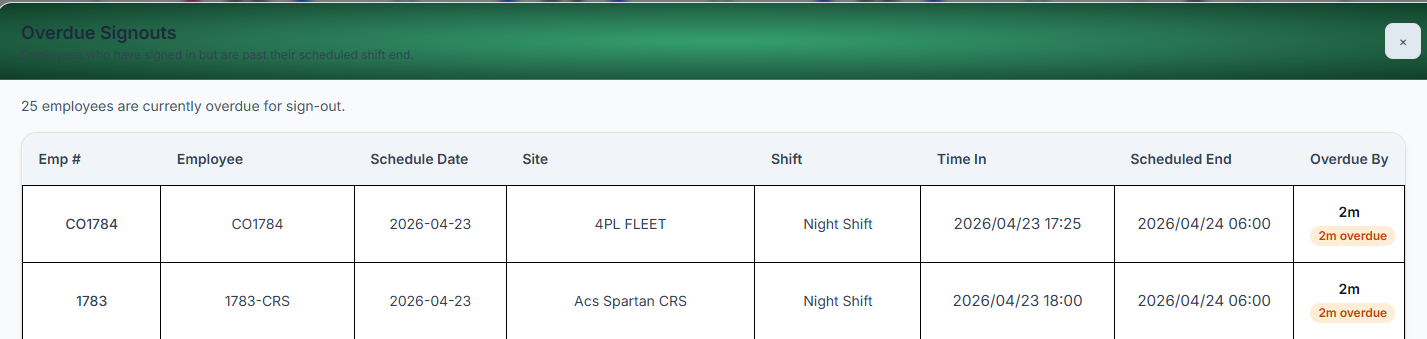
app.quantumwfm.com / overdue
Quantum Overdue Signouts dashboard
Supervisor · Overdue Signouts
Employees still signed-in past their scheduled shift end — listed live with site, shift, time in and how long they’re overdue.
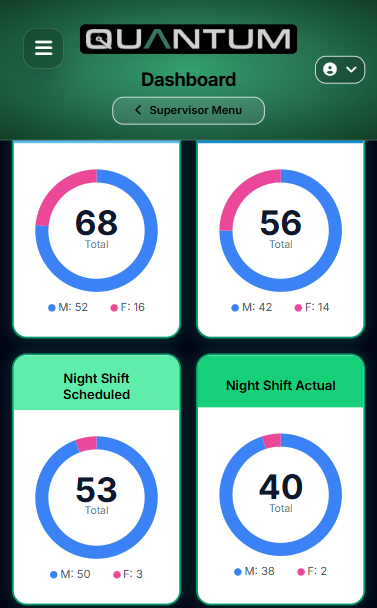
Quantum mobile dashboard
Mobile · live shift count
Scheduled vs actual, donut charts per shift, on your phone.
Modular · start with what you need

Start with one. Expand when ready.

Roll out payroll first if that’s the bottleneck. Attendance if it’s the gate. Scheduling if it’s the roster. They’re built to slot together — not duct-taped.

Getting started

From signup to live, in four stages.

A typical rollout moves through these stages — from scoping the operation to running payroll in parallel against your current system. Exact timelines depend on site count and shift complexity.

  1. 01
    Kickoff

    Scope your operation

    Walkthrough of your sites, shifts, pay-rules and existing payroll system. We map your world into Quantum.

  2. 02
    Setup

    Load & enrol

    Sites, shifts and employees loaded. Face enrolment on-site. Supervisors trained on the app.

  3. 03
    Go live

    First clock-ins

    Rosters published. First live attendance at the gate. Alerts configured for your ops team.

  4. 04
    Parallel run

    First pay-run

    Payroll calculated in Quantum alongside your current system. When the numbers agree, you’re off the old one.

Ready to deploy

Show me on my own roster.

30-minute live demo, plugged into your sites, your pay-rules.